Appearance
Use the engineer workspace
Use the App's engineer workspace to review tasks and work orders, then open a work order for on-site service.
Overview
The engineer workspace is the mobile entry for field service tasks. It summarizes pending work orders and provides access to work orders, equipment, knowledge, customers, and contacts.
Your organization can configure different mobile workspace templates by role. Menus, labels, and their order can differ from these examples.
Before you begin
IMPORTANT
- Use a field engineer account with Service Pass App access.
- An administrator assigned the field engineer role and required work order and field permissions.
- An administrator configured and enabled the mobile workspace template.
Procedure
- Sign in to the App and select Service Pass in the bottom navigation.
- Confirm that the page shows Engineer Workspace.
- Under Pending Work Orders, select Pending.
- Open a work order and verify the task, number, customer, phone, service address, and process progress.
- To find all accessible work orders, return to the workspace and select Work Order Management. Search or filter as needed.
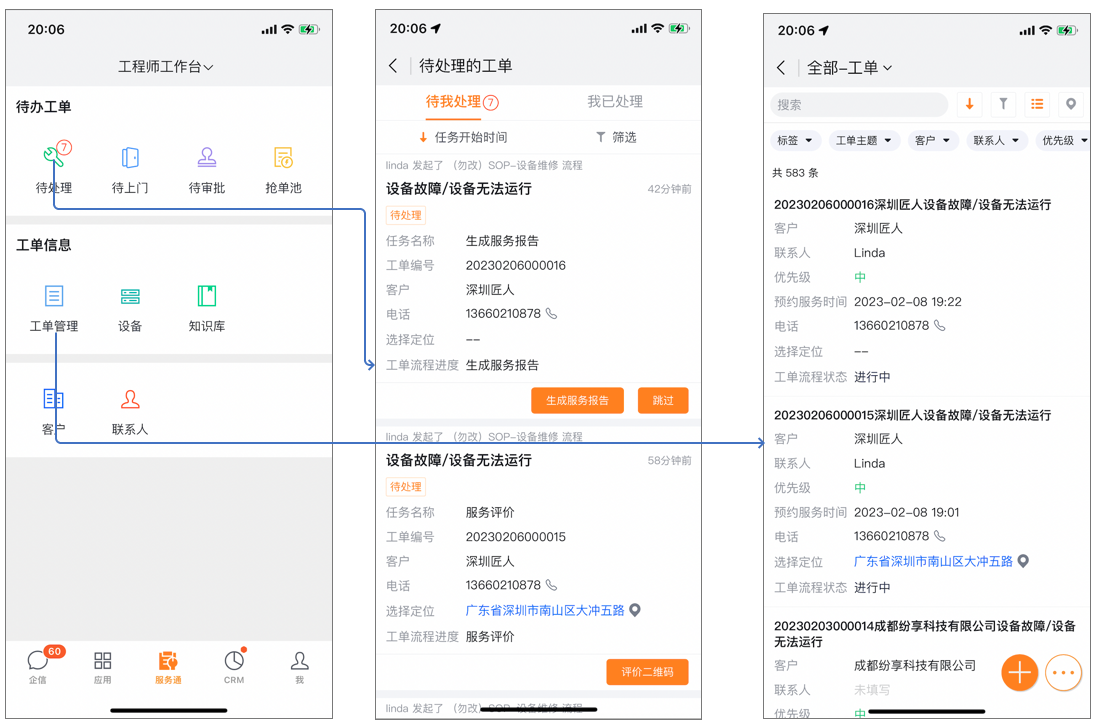
Workspace areas
| Area | Example entries | Purpose |
|---|---|---|
| Pending work orders | Pending, Upcoming Visits, Pending Approval, Claim Pool | Review tasks assigned to the current account |
| Work order information | Work Order Management | Search all accessible work orders |
| Business resources | Equipment, Knowledge Base | Review equipment or field service guidance |
| Customer information | Customers, Contacts | Review linked customers and contacts |
NOTE
The workspace template, role permissions, and field permissions control entries and data scope.
Expected result
- The workspace displays entries available to your account.
- Pending lists your pending work orders and opens their details.
- Work Order Management searches all work orders available to your account.
Notes
- Menu labels, order, and visibility depend on your organization's configuration.
- If the bottom navigation omits Service Pass, open it from the App launcher.
- If workspace entries are unavailable, ask an administrator to check your role, template, and menu permissions.
- Field and data permissions control customer, contact, and equipment information.