Appearance
Service plan overview
Overview
Service plans schedule recurring maintenance, inspection, and other service activities for Accounts or Equipment. After a plan takes effect, the system creates work orders of the configured business type on scheduled dates. The work order process then handles dispatch and on-site service.
A typical scenario is that after the equipment is sold, it still needs to be inspected regularly according to the maintenance agreement. The service plan solidifies the "service objects, cycles, responsible persons, work order types and processes", reducing manual repeated order creation and retaining the execution time of each plan.
Applicable scenarios
| Scenarios | Planning objects | Suitable frequency methods | Generate results |
|---|---|---|---|
| Regular return visits, maintenance or inspections for customers | Customers | By time period | Generate service type work orders for customers that meet the scope |
| Maintenance for a single device | Equipment | By time period; equipment plans can also be based on operating hours | Generate service type work orders for equipment that meets the scope |
NOTE
The original data only states that the equipment plan supports calculation based on operating hours, but does not explain how the operating hours data is collected. Whether this method can be used depends on the current enterprise's service plan form and device data.
Working link
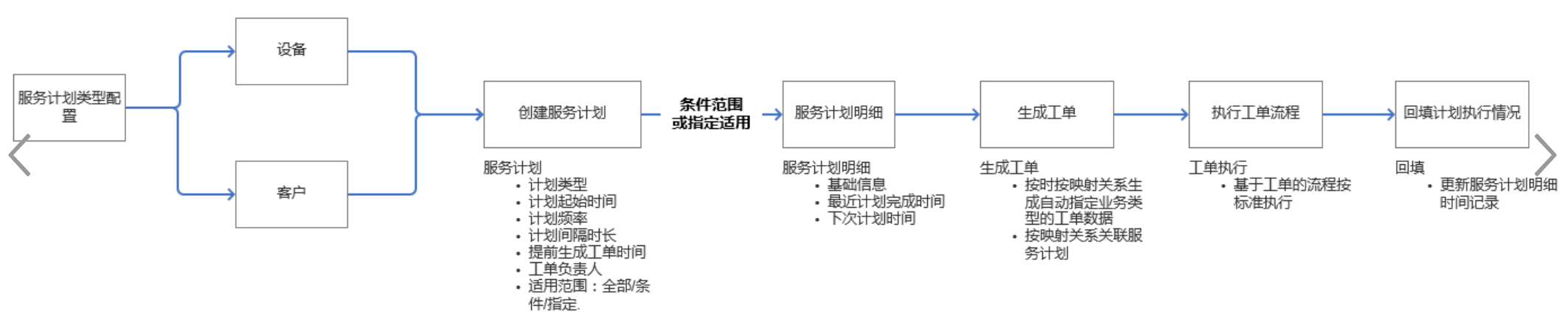
The full link to the service plan is:
- Configure the service plan type and determine the plan object, generated work order business type, service process and field mapping.
- Create a service plan. Enter its cycle, dates, owner, and applicable account or equipment scope.
- Publish a service plan. Only published plans enter the automatic execution range.
- The system traverses the eligible service plan details at 8 a.m. every day and creates a work order corresponding to the business type.
- The generated work order is processed according to the configured service process, and the plan details are backfilled with execution information such as the latest planned completion time and the next planned time.
Core concepts
| Concept | Description | Configuration Key Points |
|---|---|---|
| Service plan type | Plan template entry, defining objects, work order business types, service processes and field mapping | Create first, then create the service plan |
| Service plan | A set of cycle rules and scope | Start/end time, interval frequency, days in advance, responsible person and release status |
| Service plan details | Customer or equipment records that are actually affected by the plan | When specifying customers or equipment, maintain objects in the details |
| Service type work order | Work order automatically generated by service plan | Work order business type and process configured using service plan type |
Product rules and restrictions
Enable rules
The enabling path is Service Pass > System Settings > Configuration Overview > Service Plan. After clicking Enable Now and confirming, the system will initialize the Service Plan and Service Plan Details objects; before enabling, you should confirm that the enterprise really needs this business object.
Range and frequency rules
- A service plan type supports Equipment or Account. Its object determines the scope options available to later plans.
- Filter the applicable scope by selected records or page conditions. Add selected accounts or equipment to the plan details.
- Customer plans can only be calculated based on time periods and work orders can be generated based on interval frequency (days); equipment plans can also be calculated based on "every X hours of operation" in addition to time periods.
- The start time, end time and "Generate work order X days in advance" jointly affect the generation date of the work order; the original data does not indicate whether the early generation is affected by other time zones or holiday rules.
Automatically execute rules
Every day at 8 a.m., the system traverses the service plan details that meet the following conditions simultaneously:
- The service plan release status is Published;
- The service end time is equal to or later than the current day;
- The work order is generated on the same day.
When the conditions are met, the system creates a corresponding service type work order based on the service type detailed in the plan. The original data does not provide "immediate generation" or manual rerun entry, and the publishing operation cannot be understood as instant order creation.
Role boundaries
- Administrator: Enable service plans, configure service plan types and schedules, and publish plans.
- Work order process participant: Process the work orders generated by the service plan. The specific handler and to-do entry are determined by the service process selected in the service plan.
- Plan Maintenance Personnel: Check the generation and backfill results of plan details. The source material does not specify independent fixed character names.