Appearance
Work order objects and fields
Overview
The Work Order object is the standard Service Pass object for customer needs, field service, and follow-up. Its API name is CasesObj. Employees, agents, end users, providers, or integrated systems can create work orders. Business types, permissions, and layouts determine entry points and visible fields.
Configure business types
Create a business type
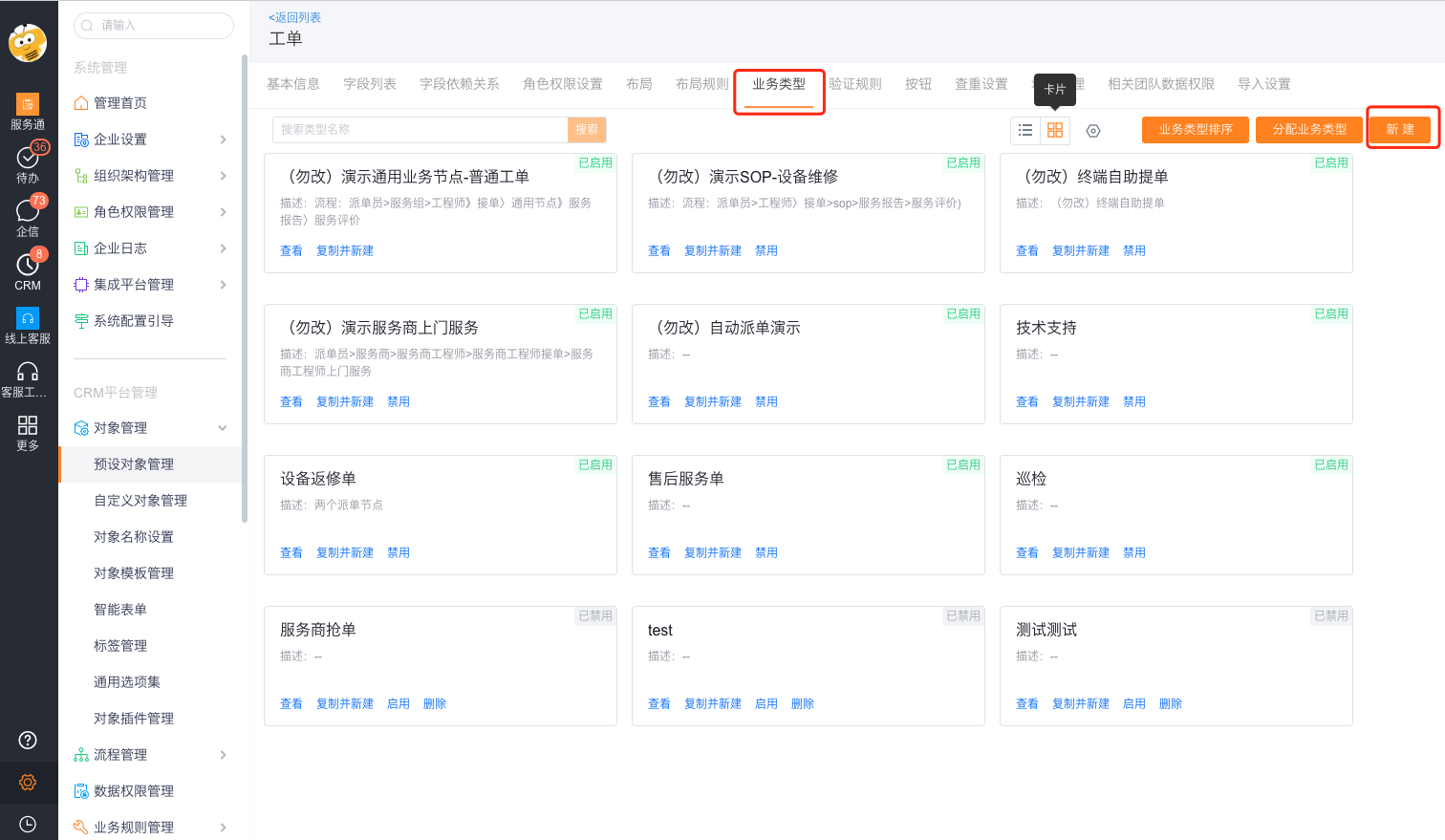
Go to Work Orders > Business Types, switch to card view, and select New.
- Enter a business type name, such as Repair, Installation, or Maintenance.
- Select its fields and visible roles.
- Select Save. The system initializes create, edit, and detail layouts with the selected fields.
Copy a business type
Go to Work Orders > Business Types.
- Select an existing business type and select Copy and Create.
- Change the new business type name and visible roles.
- Choose whether to copy its create, edit, and detail layouts.
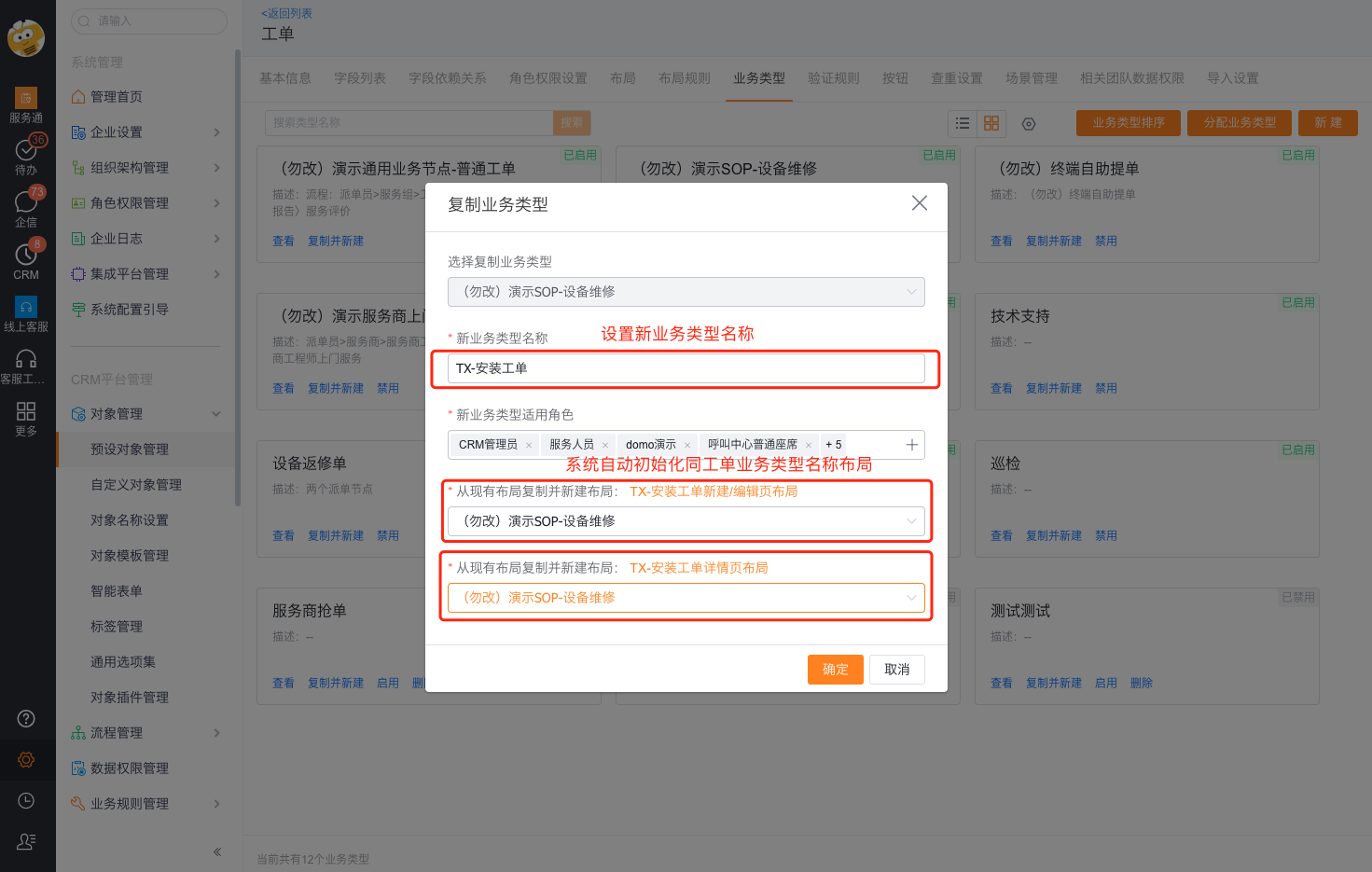
Business types, layouts, and role assignments determine which fields and buttons each entry point shows. This section explains initialization only, not complete permission configuration.
Field reference
Intake and customer information
| Field name | API name | Type | Description |
|---|---|---|---|
| Business Type | record_type | Business type | Determines fields, layouts, and visible roles. |
| Work Order Number | name | Auto number | System-generated. |
| Work Order Subject | display_name | Calculated | System-calculated display field. |
| Issue | subject | Single-line text | Summarizes the service need. |
| Issue Description | description | Multiline text | Describes the service need in detail. |
| Account Name | account_id | Lookup | Identifies the after-sales service account. |
| Contact | contact_id | Lookup | Identifies the account contact or equipment user. |
| Phone | tel | Mobile phone | Contact number. |
| Priority | priority | Single select | Organization-configured values. |
| Source | resources | Single select | Records the intake channel. |
| External Source | out_resources | Single select | Retrieved and populated by the system. |
| Category | catalog | Single select | Organization-configured values. |
Product, equipment, and service site information
| Field name | API name | Type | Description |
|---|---|---|---|
| Related Product | field_glcp__c | Lookup | Identifies the product for repair or installation. |
| Related Equipment | field_glsb__c | Lookup | Identifies equipment in a single-equipment scenario. |
| Appointment Time | booking_time_range__c | Appointment range | Records the customer's acceptable service window. |
| Service Location | field_serviceAddress__c | Location | Records the on-site service address. |
| Pre-service Condition | field_gcjl__c | Multiline text | Records the condition before service. |
| Pre-service Photos | field_xcpz__c | Image | Records the site before service. |
| Post-service Photos | field_photos_after_service__c | Image | Records the site after service. |
| Post-service Condition | field_situation_after_service__c | Multiline text | Records the result or site notes. |
Process and work order status
| Field name | API name | Type | Description |
|---|---|---|---|
| Work Order State | cases_state | Single select | Application or post-process actions can change it. Values depend on configuration. |
| Work Order State History | cases_state_log | Multiline text | System-populated state log. |
| Current Stage Start Time | field_currentTaskStartTime__c | Date and time | Start time of the current process stage. |
| Work Order Process Progress | field_workflowProgressName__c | Single-line text | Name of the current business process stage. |
| Work Order Process Status | field_workflowStatus__c | Single select | System-maintained: In Progress, Completed, or Terminated. |
| External Process Assignee | field_downstreamDealedUser__c | Multiline text | Current assignee in the enterprise's external process. |
| External Process Progress | field_workflowPartnerProgressName__c | Single-line text | External process progress when enabled. |
| External Process Status | field_workflowPartnerStatus__c | Single select | External process status when enabled. |
Dispatch and field service personnel
| Field name | API name | Type | Description |
|---|---|---|---|
| Assignment Type | field_assignType__c | Single select | System-populated. |
| Assignment Method | assign_way__c | Single select | System-populated method, such as manual or automatic. |
| Planned Service Time | plan_time_range__c | Date range | Planned service window. |
| Actual Service Time | actual_time_range__c | Date range | Actual service window. |
| Assignment Time | assign_time__c | Date and time | System-populated. |
| Assignment Status | field_assignStatus__c | Single select | System-populated. |
| Dispatcher | assign_user | User | Records the user for manual assignment. |
| Service Engineer | field_xcfwry__c | User | Current primary service engineer. |
| Supporting Engineers | related_service_personnel__c | User | Supporting engineers. Some tenants also use a Service Personnel detail object. |
| Transfer Reason | reasons_for_transfer__c | Single select | Records the reason for transfer. |
| Rejection Reason | reasons_for_rejection__c | Single select | Records the reason for rejection. |
| Service Group | field_serviceGroupName__c | Single select | System-populated internal service group. |
| Service Group ID | field_serviceGroupId__c | Number | System-populated. |
| Service Group Dispatcher | service_group_assign_user | User | System-populated group dispatcher. |
| Group Assignment Time | service_group_assign_time__c | Date and time | System-populated. |
| Group Assignment Method | service_group_assign_way__c | Single select | System-populated. |
Common audit fields
| Field name | API name | Type |
|---|---|---|
| Status | cases_status | Single select |
| Lock Status | lock_status | Single select |
| Lifecycle Status | life_status | Single select |
| Owner | owner | User |
| Owning Department | data_own_department | Department |
| Owner Department | owner_department | Single-line text |
| Created Time / Created By | create_time / created_by | Date and time / User |
| External Owner | out_owner | User |
| Last Modified Time / Last Modified By | last_modified_time / last_modified_by | Date and time / User |
Equipment work order scenarios
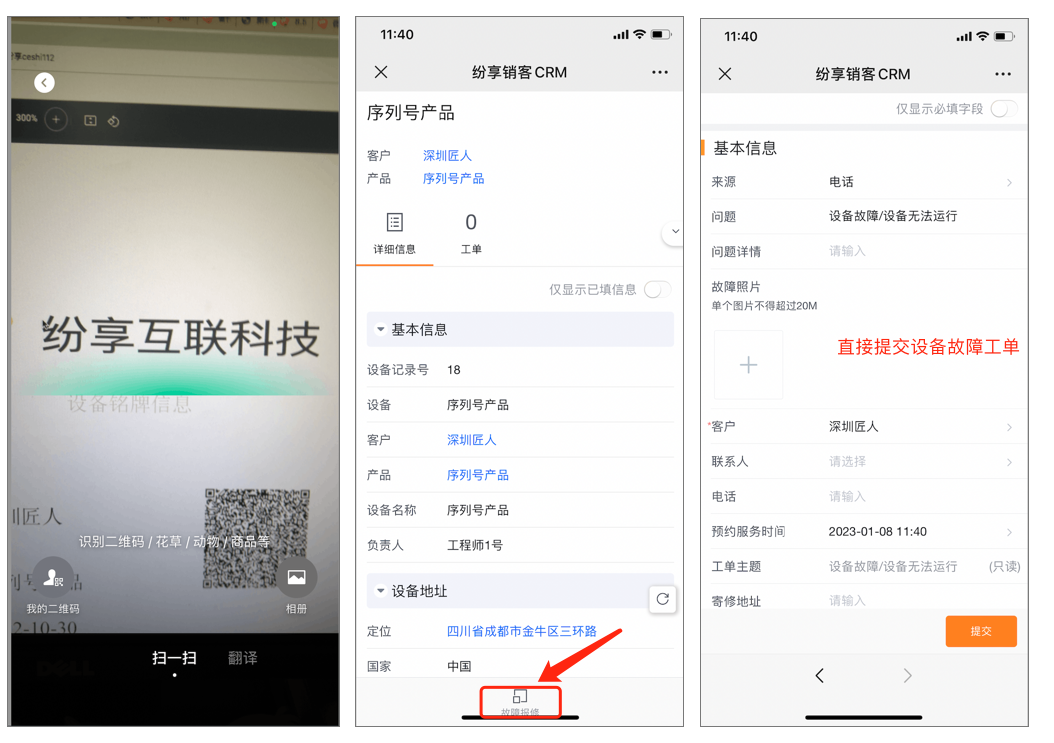
Single-equipment repair request
Prerequisite: Enable equipment management and expose Report Failure on the equipment detail layout.
The Report Failure button can map equipment data to a new work order. Configure its layout, role permissions, and field mapping for your business.
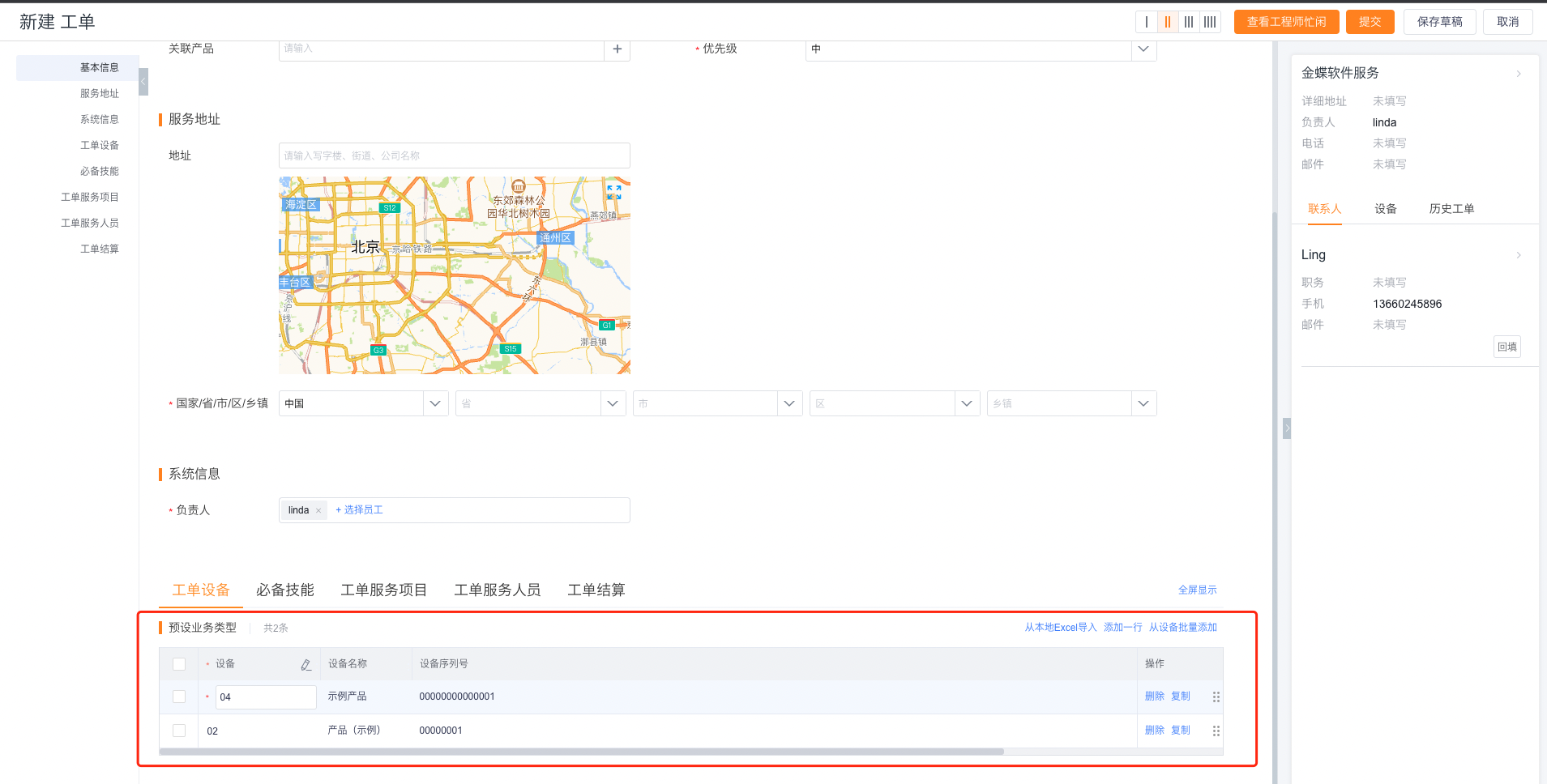
Multi-equipment work orders
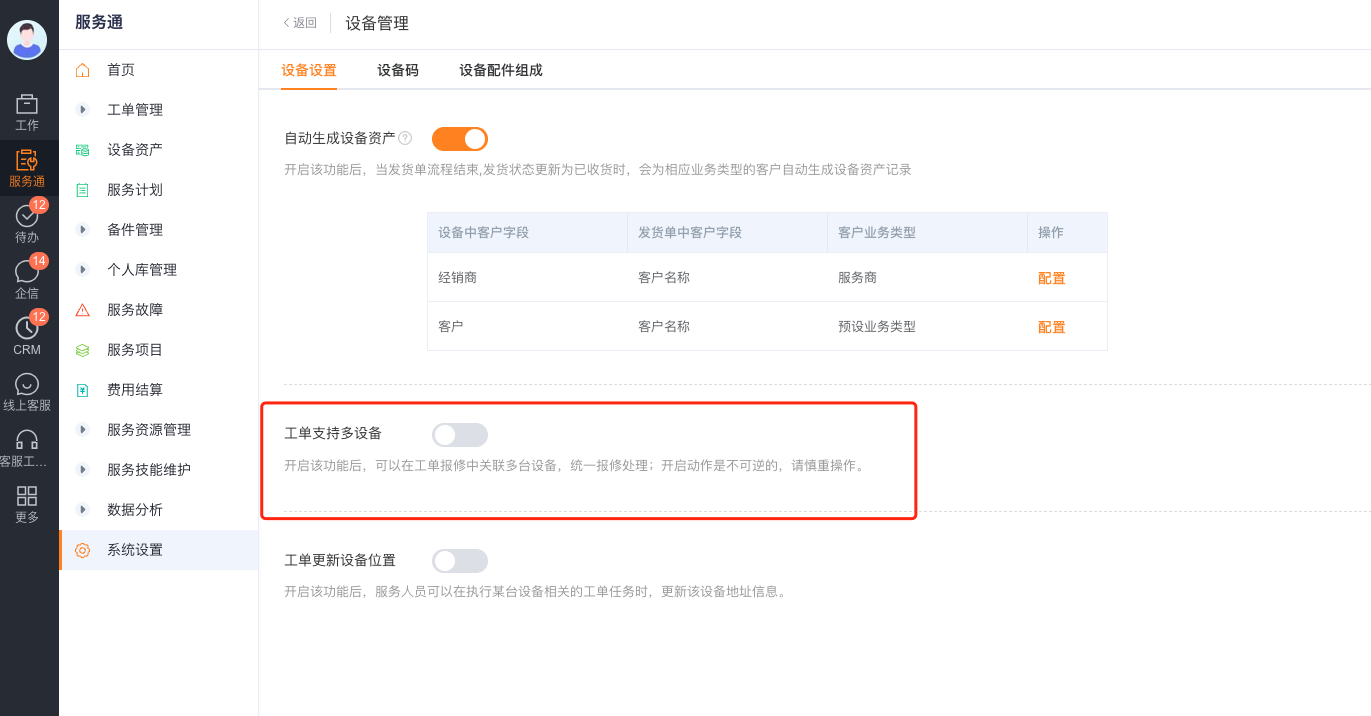
Use this scenario when one repair or installation covers multiple devices with different field actions.
- Enable multi-equipment work orders.
- Add the Work Order Equipment detail object to the Work Order object.
- Associate multiple equipment records during submission.
- Configure equipment-specific actions in the multi-equipment work order SOP.
Limitations
- Role permissions, business types, and layouts determine visible entry points, fields, and buttons.
- Equipment repair requires equipment management. Multi-equipment scenarios also require the Work Order Equipment detail object.
- Your process determines
cases_statevalues. Do not infer a fixed state set from this page. - The system or process maintains
field_workflowStatus__c, assignment fields, and audit fields. Manual changes can conflict with business logic. - Equipment field mapping and button labels can differ between organizations.