Appearance
Configure process external notifications
Overview
This guide is intended for Service Pass administrators and explains the configuration entry, key configuration items, and verification points of this topic.
Before you begin
- Use the Service Pass administrator or an account with the permission to configure this topic.
- First confirm that the business objects, roles, channels or plug-in dependencies of the scenario corresponding to the text are enabled.
- Prepare test work orders, test accounts or test channels to verify configuration results.
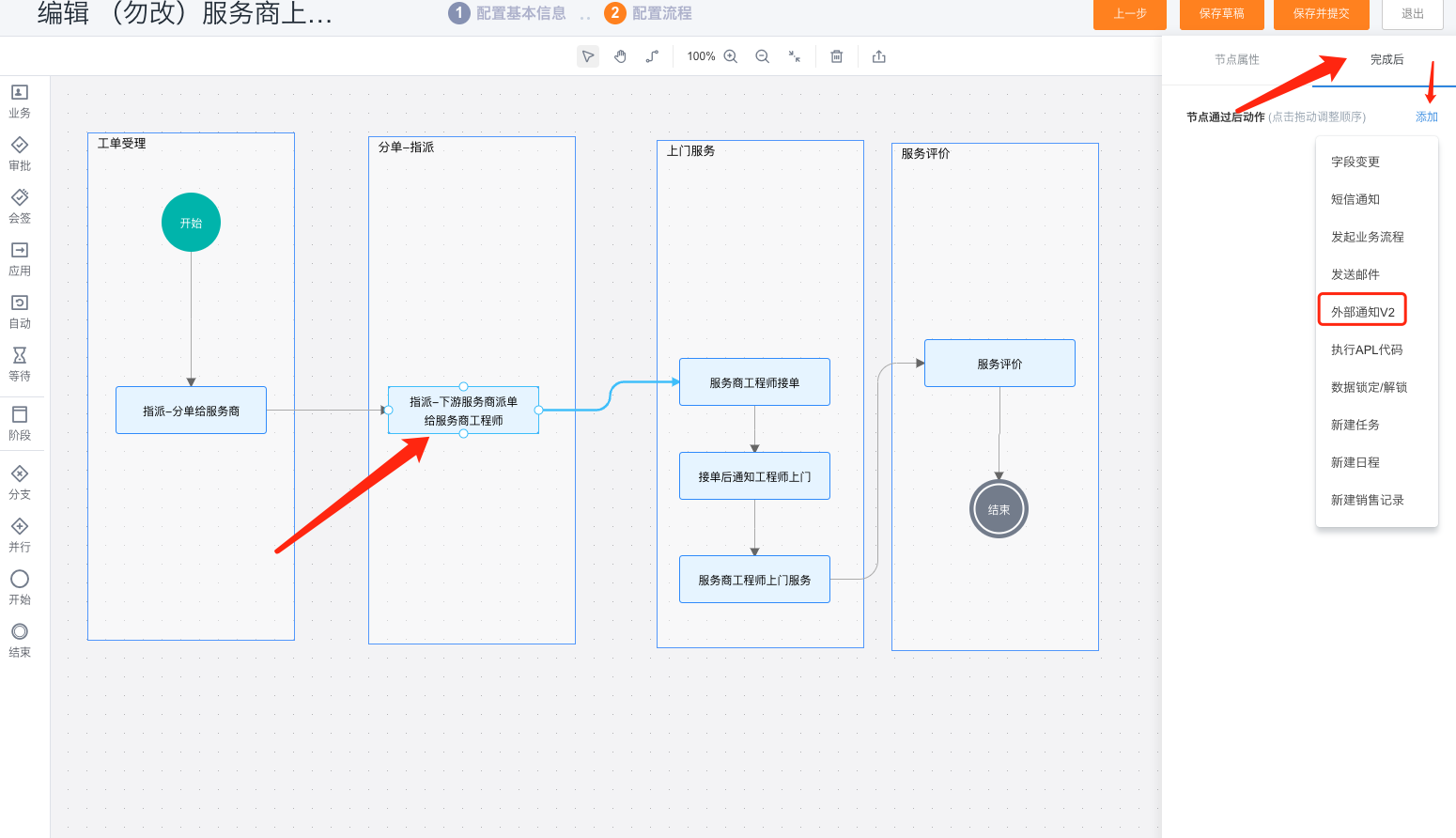
1. Introduction to process notification
Process external notifications tell an external service provider to assign a dispatcher or engineer to a work order.
2. Customized process external notification (WeChat)
You can use the post-process action capability to configure notification content for external end users at the service process node.
- Select the process node that sends the notification, then select Finish.
- Select Add > External Notification.
- Configure the external notification parameters.
- Send notifications through the WeChat Official Account. The account must be connected, and service provider staff must follow it and register.
You can add an automatic node before executing the node
- Select the automatic task node.
- Select Add > External Notification.
- For the application, select Service Provider Service Pass. For recipients, select Service Provider Engineer or Service Fulfillment Account > Service Provider Engineer.
Note: If you can't find the required template, sign in to the WeChat Official Accounts Platform and add the message template first.
3. External notification of default process
- In the application node of the work order process, the system automatically pushes the WeChat official account message to the service provider. Note: Service provider personnel who are not bound to the official account cannot receive the message.
- As shown in the figure below, the system has preset notification content and order dispatch notification.
- Click Disable in the action column and the message will not be pushed.
Process external notification: specifically refers to notification to external end users. For example, when an external end user submits a work order or invites an external user to conduct a service evaluation, a notification can be sent to the external user.
Notification types include:
(1) WeChat Official Account notification. Prerequisite: Connect a WeChat Official Account. The end user must follow it and complete registration.
(2) WeChat Mini Program service notification, prerequisite: WeChat Mini Program is used and the end user has completed registration.
(3) SMS notification requires purchase/activation of SMS service
2. Custom process external notification
- Select the node to which external notifications need to be notified and click Finish;
- Click "Add" and select external notification;
- Customize relevant parameters of external notifications
- External notifications are sent to the WeChat service account. Note: If the end user has not registered and bound with the WeChat official account, the notification cannot be received. Only users who have registered with the WeChat official account can receive WeChat messages.
2.1 Maintain WeChat Official Account message templates
Note: If you can't find the required template, sign in to the WeChat Official Accounts Platform and add it from the template library.
Step 1: Add service categories to the template library
Step 2: Select the appropriate template in the template library
3. Custom process SMS notification
Prerequisite: Activate the SMS service plugin. For configuration and verification, see Configure end-user notifications.
After activating the SMS service, you need to configure SMS signature information, template management, and have a sufficient number of SMS messages before you can send SMS messages normally. For details, you need to go to the SMS service to purchase quotas, apply for SMS signatures, and configure SMS templates.
Action selection after the work order process: SMS notification
The process can send text messages to internal personnel, or specify the mobile phone number of external personnel to receive.
If the mobile phone number is not configured, you need to go to Organizational Structure Management-Departments and Personnel to configure the personnel;
If you do not add a mobile phone number, you will not be able to send text messages;
4. Default WeChat service account external notification
- In the application node of the work order process, the system automatically pushes WeChat public account messages to customers. Note: Customers who have not followed the public account cannot receive the messages.
- As shown in the figure below, the system has preset notification content, including pushing the bill of lading success notification to the end user after the bill of lading is successful, pushing the service evaluation invitation message at the service node, etc.
- Click Disable in the action column and the message will not be pushed.
- Work order submission: The end user submits the work order in the WeChat service account and then pushes it to the submitter.
- Work order completion: After the work order process is completed, it will be pushed to the submitter on the WeChat service account
- Work order terminated: After the process is terminated, notify the submitter through the WeChat Official Account.
- Invite evaluation: The work order process flows to the service evaluation application node and is pushed to the submitter on the WeChat service account
- Successful evaluation: After submitting the service evaluation, it will be pushed to the submitter on the WeChat service account
- Service report: After the service report is generated, it will be pushed to the service report recipient on the WeChat service account.
- Service report signature: After the service report is generated, it will be pushed to the invitation signature recipient on the WeChat service account.
Edit notification content and customize message content:
- Click Select Template to select WeChat’s template message
- Customizable summary fields
- Customizable keyword push fields
5. Default WeChat mini program service notification
- In the work order process, mini program messages are automatically pushed to customers. Note: Customers who have not submitted work orders from the mini program cannot receive the messages.
- As shown in the figure below, the system has preset notification content, including pushing the bill of lading success notification to the end user after the bill of lading is successful, pushing the service evaluation invitation message at the service node, etc.
- Click Disable in the action column and the message will not be pushed.
Edit applet notification
- Mini program template messages cannot be changed
- Customizable keyword push field content
6. Default SMS notification
- The system automatically sends SMS notifications to customers during the work order process. Messages aren't sent when the SMS quota is insufficient. For configuration and verification, see Configure end-user notifications.
- The system includes preset messages, such as work-order submission confirmation and service-evaluation invitations.
- Click Disable in the action column and the message will not be pushed.
7. Notification examples
After the end user places a bill with the WeChat service account, the WeChat service account notification received is as follows:
After the end user submits a work order in the mini program, the schematic diagram of the mini program notification received is as follows:
Expected results and verification
- After saving the configuration, use the role, channel or test ticket corresponding to the scenario in this article to verify the entry and results.
- If configured as a process, notification or automated task, both the trigger condition and the next responsible role should be verified.
Notes
- The actual visible menus, fields, buttons and channels depend on the configured role permissions, business type and pre-plugins.
- For grayscale, optional or ability to rely on external channels, first confirm that the dependency is enabled, and then verify it on the test record.