Appearance
Configure service offerings
Overview
Service offerings define standardized after-sales work and pricing, such as equipment commissioning or per-visit cleaning. Users add offerings to work orders to record completed service and support later settlement.
Before you begin
- Use an account that can access and maintain service item data.
- First determine the name, service content, measurement method and price of the service item.
- If the service item is only applicable to a certain type or type of equipment product, first confirm that the corresponding equipment product information already exists.
Create a service offering
- Open Service Items in Service Pass.
- Click New on the page.
- Fill in the service item content in the new window.
- If the service item is only available for specific equipment products, select the corresponding product in Associated Equipment Products.
- After checking the service content and price, complete the creation.
Associated equipment products are used to limit the scope of service items. For example, after an item that is only used by a certain model of engine is associated with the engine product, the actual work order can reference the item according to the corresponding equipment product.
Use service items in work orders
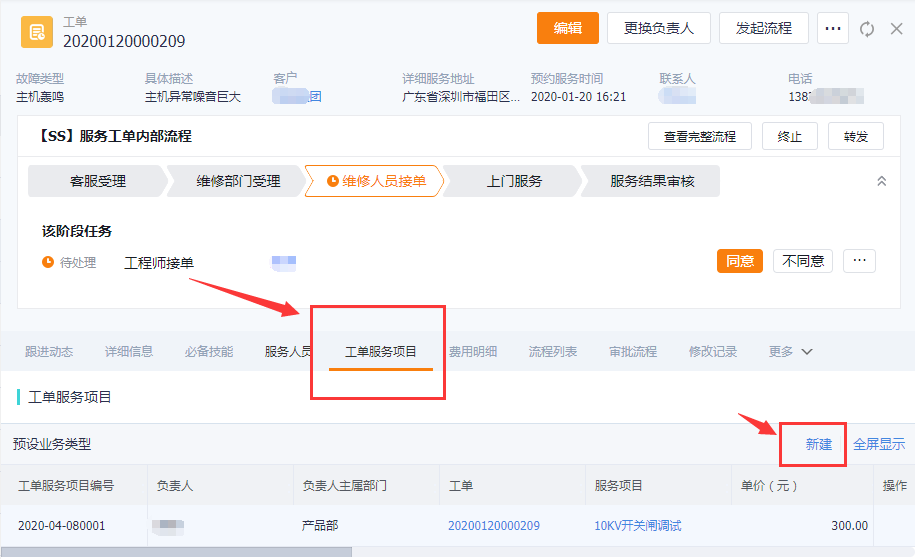
- Open the work order details for which service content needs to be recorded.
- Enter the Work Order Service Items tab. The text description of the upstream information also refers to this tab as "Service Items".
- Click New.
- Select the service item in the pop-up window and fill in the work order service item record according to the actual execution status.
- After completing the creation, return to the tab to check the service items, quantity or price and other record contents.
Expected results and verification
- Service items become standard service content that can be referenced in corresponding work orders.
- Service items associated with equipment products are used for work orders of corresponding products.
- The Work Order Service Items tab of the work order displays the actual service item record, which can be used for subsequent inquiries or as a basis for settlement.
Notes
- Associated Equipment Products expresses the product scope of service items. Don't configure a service offering that only applies to a specific product as a universal offering.
- The work order service items record the actual execution content. The service agreement write-off and charging use the Work Order Service Product, and they are not the same object.
- The upstream information does not describe the deactivation, deletion or history processing rules after the service item is created. Before adjusting a service item that has been put into use, you should first check whether it has been referenced by a work order.
FAQ
Why do we need to create a new work order service item separately in the work order?
Service items are standard basic data maintained by the enterprise; work order service items are the actual execution records of this work order. Only by adding a record to the work order can you explain the specific services provided by this work order.
Can the service item directly write off the service agreement?
It cannot be judged based on this. Service agreement matching and write-off are based on Work Order Service Product and Service Product Consumption Confirmation. Service items are mainly used to record service content and prices.