Appearance
Configure a WeChat Mini Program channel
Configure WeChat Mini Program to provide mobile service entrance for end users.
Overview
End users can enter the customer self-service portal through the system public applet or enterprise-specific applet. Public Mini Programs can directly use the QR code provided by the system; enterprise-specific Mini Programs can display the company's Mini Program name, logo and subject information, but need to complete WeChat side authentication, authorization, code review and release.
Before you begin
- Confirm that the End User Service Pass is enabled and the mobile portal page has been configured.
- Confirm the account opening policy; public Mini Program information shows that guest access may be enabled by default.
- An enterprise-specific Mini Program must be a corporate account certified by the enterprise. Mini programs applied by individuals are not supported.
- Use Chrome for account binding. The 360 Browser is not supported.
- If there is an existing Mini Program that still carries other services, do not bind it directly. Binding will cover the original functions of the Mini Program, so you should apply for a separate Mini Program.
Use public applet
- Enter the configuration page in Service Pass > System Settings > Full Function Configuration > End User Service Pass > Connect WeChat Mini Program.
- Download the system public applet QR code.
- Send the QR code to the end user or post it on the device.
- Before official distribution, verify whether the guest, self-registration, and connected role permissions are as expected.
Public Mini Programs cannot display the enterprise's customized Mini Program name, logo, and subject information to the outside world. If you need a corporate brand entrance, upgrade and bind the corporate exclusive Mini Program.
Prepare enterprise-specific Mini Programs
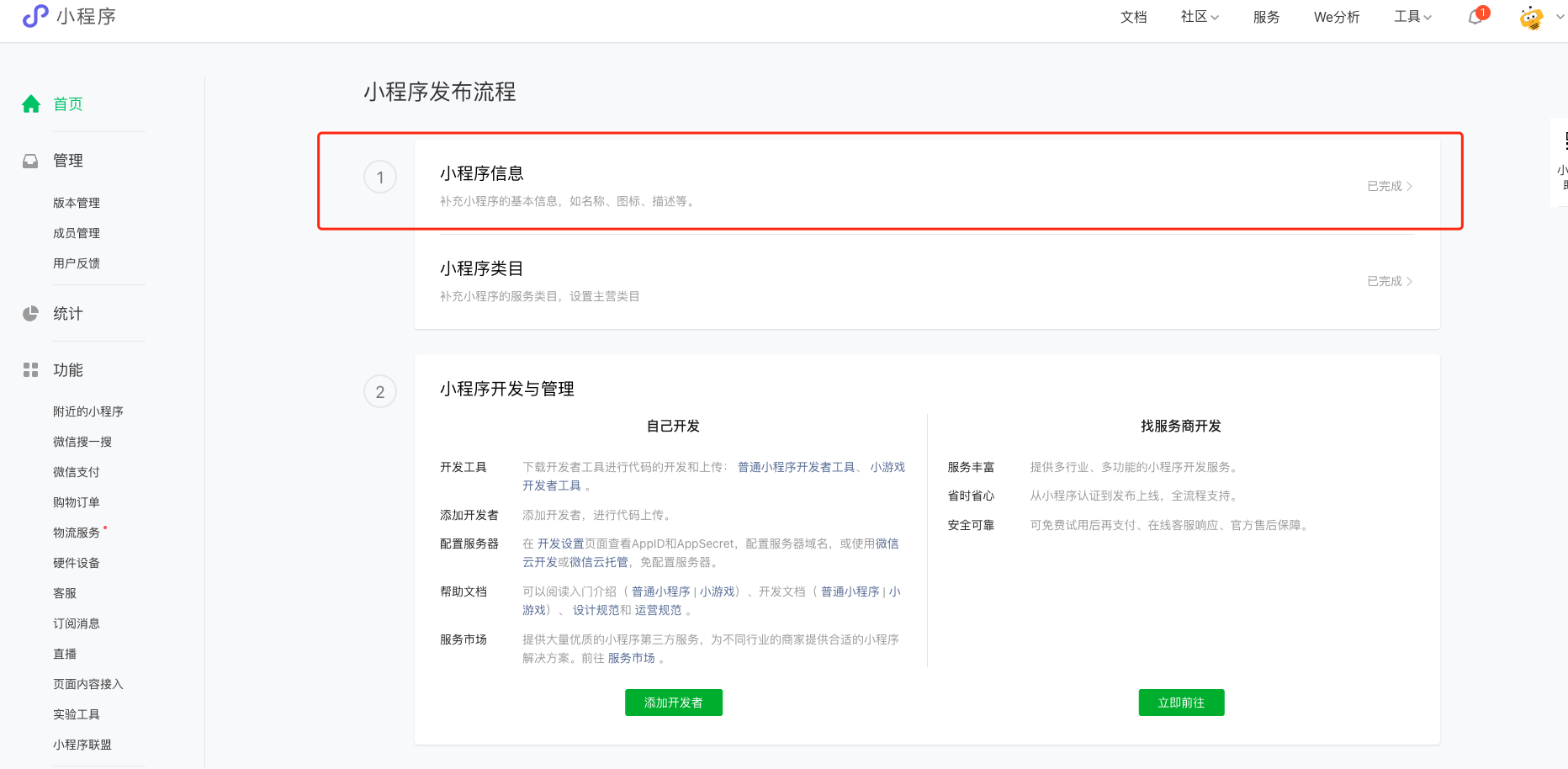
Improve basic information and service categories
- In the WeChat Mini Program admin console, enter the name, icon, description, and other basic information.
- Add the categories required for the business in Settings > Basic Settings > Service Category Settings. Categories listed in the original data include:
- Business Services > Business Management
- Life Services > Housekeeping Services
- Tools > Device Management
Apply for positioning interface
- Go to Development Management > Interface Settings in the WeChat Mini Program background.
- Apply for the Get current geographical location and speed interface.
- Fill in the application reasons based on the actual after-sales service scenario of the company, and upload a screenshot of the page that can prove the scenario.
The reason for application should be consistent with the configured service category and real business. Do not copy the example directly. After submission, the WeChat backend will display the interface as under application, and the final approval will be determined by WeChat review.
Bind and publish enterprise-specific Mini Programs
- Select Upgrade to enterprise-specific Mini Program in Service Pass > System Settings > Full Function Configuration > End User Service Pass > Connect WeChat Mini Program.
- The Mini Program administrator scans the authorization code and selects the "Mini Program" type account in the public platform account list.
- Retain the authorization permissions required by Fenxiang Sales, especially do not cancel the permissions related to the open platform, web page authorization and user management.
- After authorization is completed, select the Mini Program function version to be released.
- Select Submit for Review to send the current Mini Program version to WeChat.
- After passing the WeChat review, confirm that the online version and exclusive Mini Program QR code are available.
Versioning and Reauthorization Rules
- A WeChat Mini Program can only be authorized to one Fenxiang application, such as one of Marketing Pass, Order Pass or Service Pass.
- When a Mini Program needs to readjust its permissions, it can re-authorize the original Mini Program; it cannot directly overwrite the authorization with another Mini Program. Unbind the current applet before changing the applet.
- When the official account has been bound, the Mini Program and the official account use the same subject, which is beneficial to page jumps and data sharing; if the subjects are inconsistent, they may not be able to jump to each other.
- Submission for review is required when a new version is discovered. The version under review will not block the use of the online published version, but the system may not prompt for the next update.
- After the version release fails, initiate review again through the resubmit entry on the page.
Expected results and verification
- Use WeChat to scan the QR code of public or exclusive Mini Programs.
- Confirm that the Mini Program enters the end-user portal of the current enterprise.
- Use unregistered and registered test accounts to check account policies and role permissions.
- Check the name, logo, main information and online version of the exclusive Mini Program.
- Submit a test work order to confirm that the form, object permissions, and subsequent subscription notification entrances comply with the configuration.
FAQ
- Prompt that the account is not authenticated: Re-authorize after completing the enterprise authentication in the WeChat Mini Program background.
- Official account mistakenly selected after scanning the QR code: Let the Mini Program administrator scan the QR code again and select the "Mini Program" type account.
- A message says the Mini Program is authorized to another platform: Revoke the other authorization or use a different verified Mini Program.
- User details are unavailable, or the Official Account link fails after authorization: Authorize again and retain the required permissions. Confirm that both accounts belong to the same entity.
- Mini program information is incomplete: Complete the basic information and service categories in the WeChat backend before authorizing.
- There is a new version but it is not online: Check the review status; resubmit if the review fails, and wait for WeChat processing if the review is in progress.