Appearance
Accept, reject, or transfer a work order
After assignment, accept the work order, reject it, or transfer it to another engineer.
Overview
| Action | Use case | Result |
|---|---|---|
| Accept | You can provide the required service | You own the task and continue on-site service |
| Reject | You cannot take the task | The order follows the configured reassignment path |
| Transfer | Another engineer should handle it | The selected engineer receives the work order |
Before you begin
IMPORTANT
- The work order is assigned to you and is at the acceptance node.
- Your process controls available actions and whether explanations are required.
- If automatic acceptance is configured, the system accepts the order after the timeout.
Procedure
In the App, go to Tasks > Pending Work Orders. Use actions from the list or open the details.
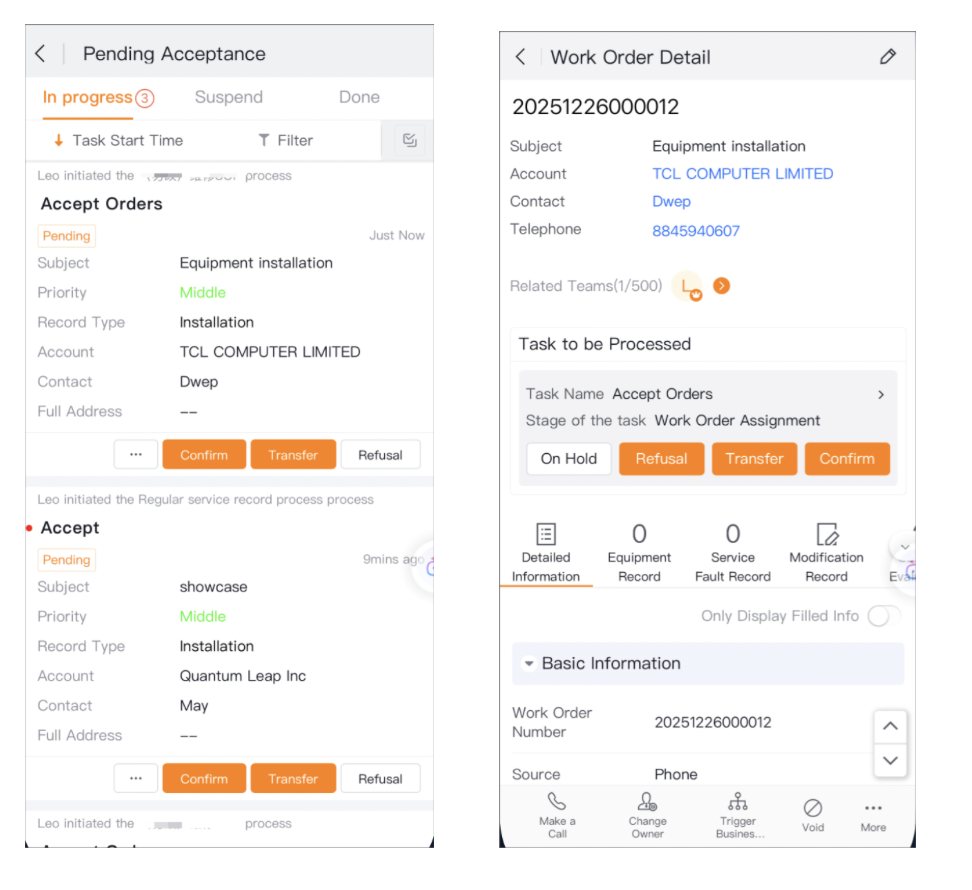
Accept
- Find the work order and verify the customer, address, and task.
- Select Accept.
- Continue with the configured on-site service tasks.
Reject
- Find the work order that you cannot take, then select Reject.
- If prompted, enter a reason.
- Verify the work order, then submit.
For service group dispatch, rejection returns the order for group reassignment. Other dispatch paths follow their configured process.
Transfer
- Find the work order that needs a new owner, then select Transfer.
- Select the replacement engineer.
- If prompted, enter a reason.
- Verify the engineer, then submit.
Within a service group, candidates normally include only other engineers in the group. Other dispatch paths use the configured candidate scope.
Expected result
- Acceptance lets you continue the downstream field service tasks.
- Rejection routes the work order for reassignment or other configured processing.
- Transfer sends the work order to the selected engineer.
Notes
- If an action is unavailable, ask an administrator to check the acceptance node.
- Your process determines whether rejection or transfer reasons are required.
- When automatic acceptance is enabled, act before the timeout.
- Before transfer, confirm that the target engineer has the required skills.