Appearance
SLA rule reference
Overview
Use this reference to review SLA control methods, timing fields, event conditions, and compliance records. Available buttons, fields, scopes, and notification channels depend on permissions and configuration.
Rule terminology
| Terminology | Meaning | Applicability |
|---|---|---|
| Scope | Determines which work orders or service requests enter the rule | Applies to both methods |
| Based on process nodes | Use process node start and completion as timing boundaries | Single node or across nodes |
| Based on object fields | Use object creation or field changes as timing boundaries | Object creation, status or field changes |
| Start timing | Node, field or condition for SLA record start time | Both methods are applicable |
| End timing | Node, field or condition of SLA record end time | Process completion or field change |
| Standard processing time | The upper limit of time used to determine whether the standard is met | Both methods are applicable |
| Early warning event | Early reminder when the standard processing time is approaching | The end condition has not occurred and the timer has not ended |
| Timeout event | Reminder or function execution after exceeding the standard processing time | The end condition has not occurred yet |
Timing and compliance rules
- Meet the standard: end time - start time ≤ standard processing time.
- Not up to standard: end time - start time > standard processing time.
- After the countdown is enabled, the task node displays the remaining duration; after the standard duration is exceeded, the timeout duration is displayed.
- Alerts and timeout events will not be triggered after the SLA timer has expired.
- End conditions based on object fields can only be set to field changes.
Comparison of control methods
| Project | Based on process node | Based on object field |
|---|---|---|
| Target Audience | Work Order or Service Request | Work Order or Service Request |
| Start condition | Start of process node | Create new object or change fields |
| End condition | Process node completed | Field changes |
| Typical examples | Assignment starts to engineers receiving orders | Work orders are created until the status changes to work order service |
| Automatic backfilling of process fields | Yes | No, the original data does not specify automatic backfilling of process instance fields |
SLA timeliness compliance status
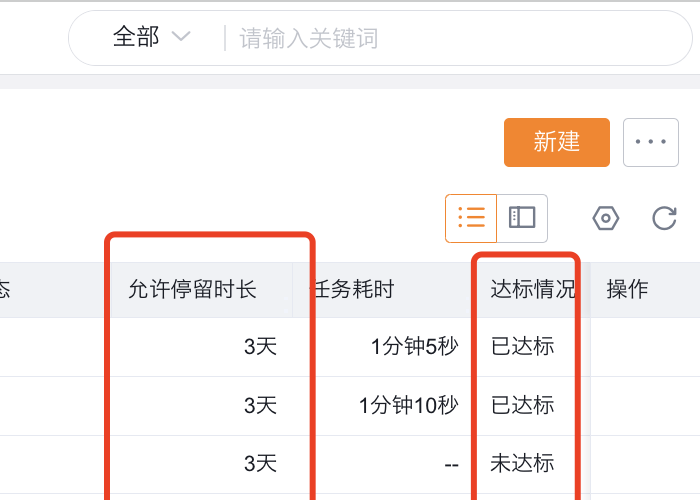
The system presets the SLA timeliness compliance object to record each task that triggers SLA control. This object is applicable to work orders and service requests. It can be used to view the task handler, final task executor, start and end time, time consumption and compliance results. It can also be used as a data source for BI statistics.
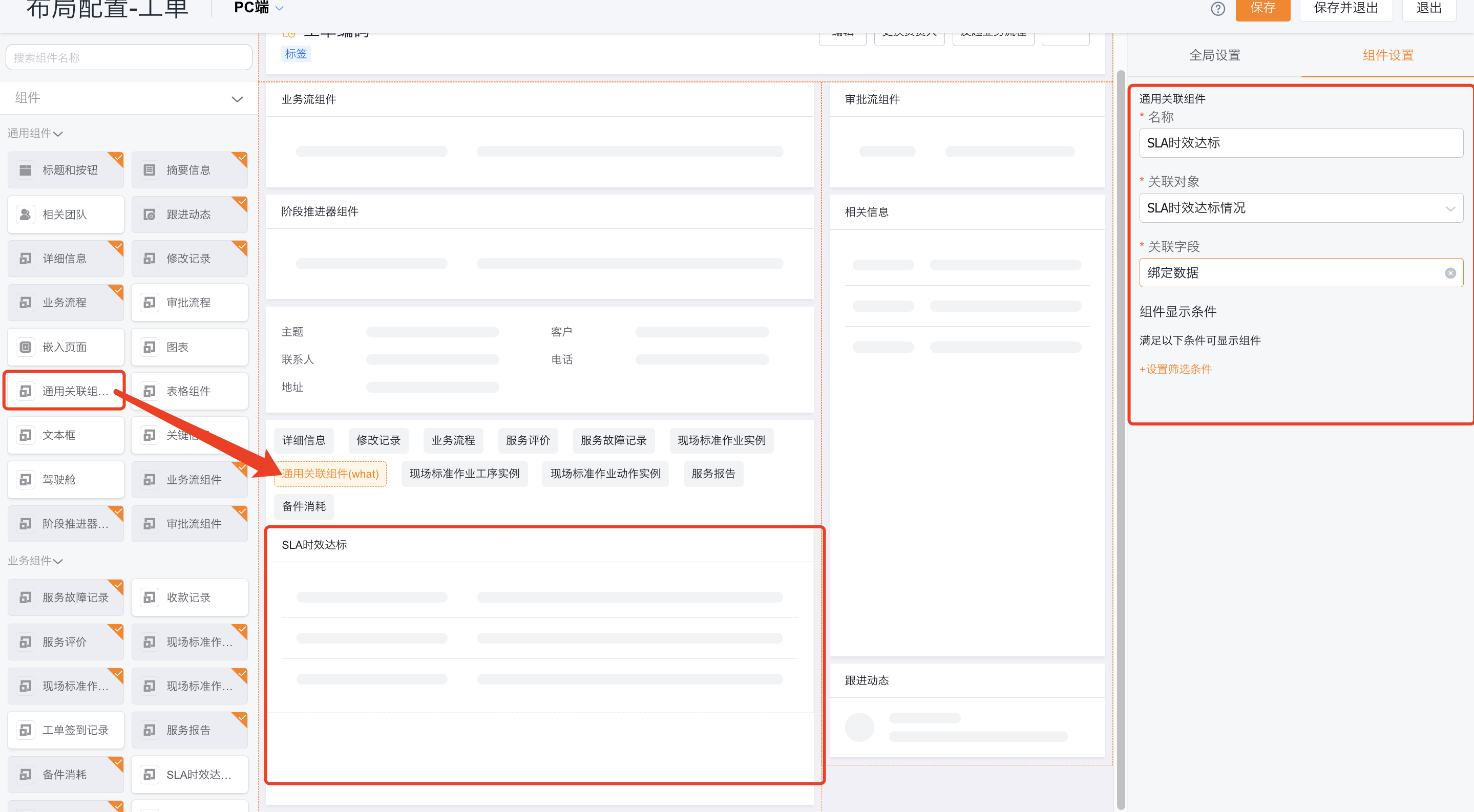
To show related records on a work order or service request, add General Related Component (What) to the detail layout. Set its related object to SLA Timeliness Compliance and bind Binding Data.
Field descriptions
| Field name | API Name | Field type | Remarks |
|---|---|---|---|
| Record number | name | Increment number | Standard record number |
| Bind data | related_object | Dynamic association | Associate work orders or service requests |
| SLA rule name | sla_name | Single line of text | |
| SLA control method | sla_way | Single choice | Process node or object field |
| SLA rule detail name | sla_detail_name | Single line text | |
| Start timing | start_time | Date and time | Start timing time |
| End timing | end_time | Date and time | End timing time |
| Standard processing time | remind_latency | Number | Standard time set by the rule |
| SLA timing duration | duration | Number | Actual timing duration |
| Timeout duration | timeout_time | Number | Duration exceeding the standard duration |
| Compliance status | sla_result | Single choice | Result of meeting the standard or not meeting the standard |
| The business process to which it belongs | workflow_instance_id | Single line of text | Automatically backfilled by the system only when it is based on process control |
| Process srcId | source_workflow_id | Single line of text | Automatically backfilled by the system when only based on process control |
| Node instance ID | activity_instance_id | Single line text | Automatically backfilled by the system when only based on process control |
| Start timing node name | activity_name | Single line of text | Automatically backfilled by the system when only based on process control |
| End timing node name | completed_activity_name | Single line of text | Automatically backfilled by the system only when it is based on process control |
Limitations and troubleshooting
| Phenomenon | Check items | Processing direction |
|---|---|---|
| SLA entry not found | Plug-in activation status, administrator permissions | Confirm SLA plug-in and permissions in system settings |
| The record does not enter the SLA | Target object, rule activation status, scope of application | Check whether the record meets the filtering conditions |
| Timing has not ended | Process end node or field change conditions | Confirm that the end condition actually occurs |
| Alert/timeout is not triggered | Event time and SLA status | It will not be triggered when the end condition has occurred or the timer has expired |
| No compliance records are visible on the details page | Common associated components, associated objects and binding fields | Associate components to SLA timeliness compliance |
The source material does not describe the complete rules for working time calendars, failure retries, batch catch-ups, and pause timings, and these behaviors should not be inferred from the field names.