Appearance
Get started with service requests
Goal
Use a self-service request to validate the shortest path from submission and claiming through closure or work order creation. An end user and an intake agent complete these steps. Administrator configuration is outside this tutorial.
Before you begin
- The administrator has enabled service requests and end-user submissions, and published the service request entry in the WeChat official account.
- The test end user has Service Request permission. For an unregistered user, enable the Connected Guest identity.
- At least one test employee is an intake agent who can access the To-Do Center.
- To test work order creation, enable service request conversion and configure field mappings.
- Prepare a problem description and contact details that are safe for testing and avoid using sensitive real customer information.
Procedure
Step 1: End user submits request
- In the enterprise WeChat public account, open the Service Request menu configured by the administrator.
- On the New Service Request page, fill in the subject, problem description, contact information, and other fields required by the page.
- After checking the required fields, click Submit.
- Confirm successful submission. Do not submit the same issue again.
Step 2: Claim the request
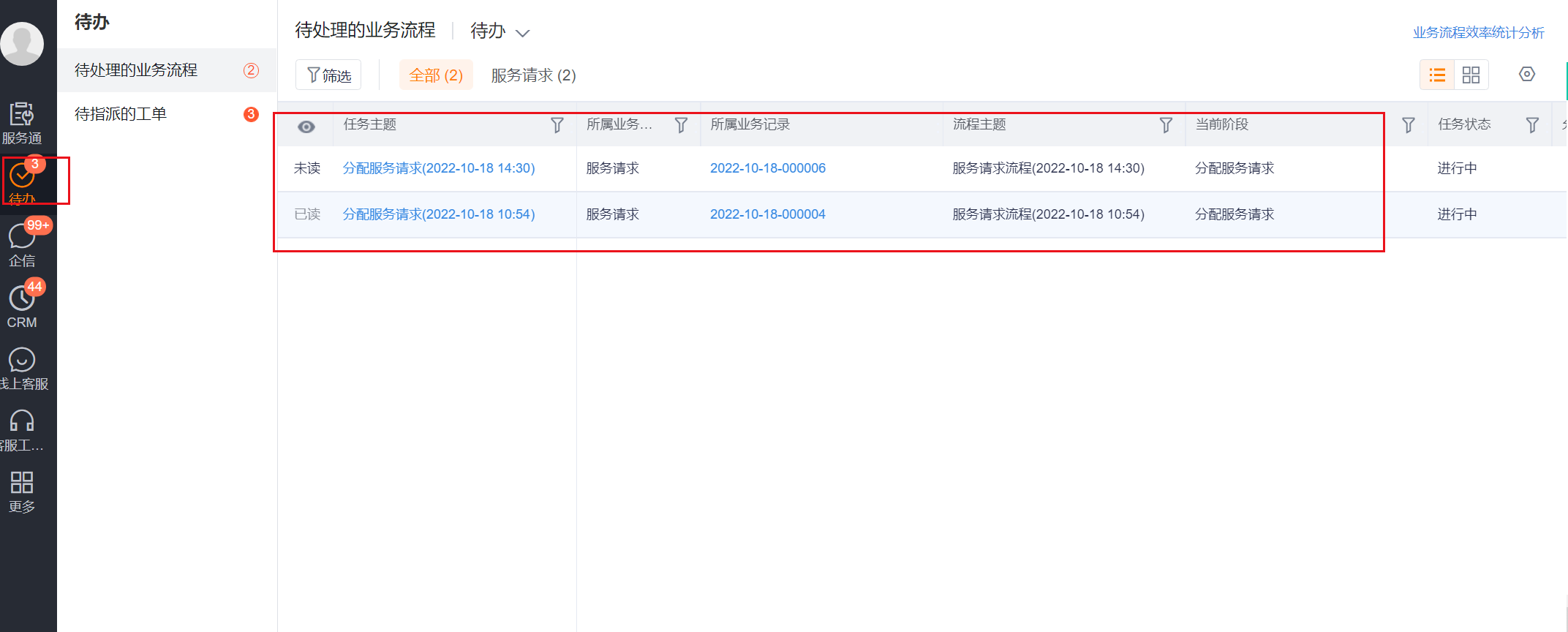
- Use the customer service account to enter To-Do Center > Pending Business Processes.
- Select the Service Request category and open the request just submitted.
- Verify the request number, customer or visitor information, problem description, and submission channel.
- Claim the request and continue to the configured processing stage.
Step 3: Complete intake
- In the service request details, supplement the information required for processing.
- Select an outcome:
- If you resolved the issue during intake, use the available close or complete action.
- If dispatch or on-site service is required, select Generate Work Order and verify the mapped information.
- Return to the service request details, check the current status and whether the associated work order has appeared.
Expected results and validation
- After the end user submits the request, the customer service agent can see the corresponding service request in the to-do center.
- After receiving the request, the request will enter the processing stage of the current enterprise configuration and will no longer remain in the unclaimed state.
- When a request is closed, the request will no longer continue into the work order dispatch process.
- When a work order is generated, the service request is associated with the new work order; subsequent order dispatch and on-site execution are performed in the work order.
FAQ
End users cannot see the service request entry
Please contact the administrator to check the end user submission switch, WeChat official account menu and individual user role permissions. If any of the three configurations are missing, the entrance may not be visible or cannot be created.
Guests cannot submit
Guest submission requires the Connected Guest identity. Permission for registered users does not grant permission to unregistered users.
An intake agent cannot see the task
Confirm that the account is an intake agent and the request is assigned to the applicable intake group. If automatic assignment is disabled or no rule matches, the visible task scope can differ.
The detail page does not provide Generate Work Order
Please contact your administrator to confirm whether service request transfer to work order is enabled. When this capability is turned off, service requests will not generate work orders according to the preset mapping.
Notes
- The page fields, business type and processing stage of the service request are configured by the enterprise, and the actual page may contain more required fields than this tutorial.
- Submit is used to formally initiate a service request; when there is a Save Draft on the page, the draft is not equivalent to the request that has entered the acceptance process.
- After converting to a work order, do not maintain the same on-site processing process repeatedly in service requests and work orders.