Appearance
Offline work order overview
Overview
Offline work orders let engineers download authorized work orders and related data before entering an area with limited connectivity. They work locally on site and upload changes after reconnecting.
Applicable scenarios
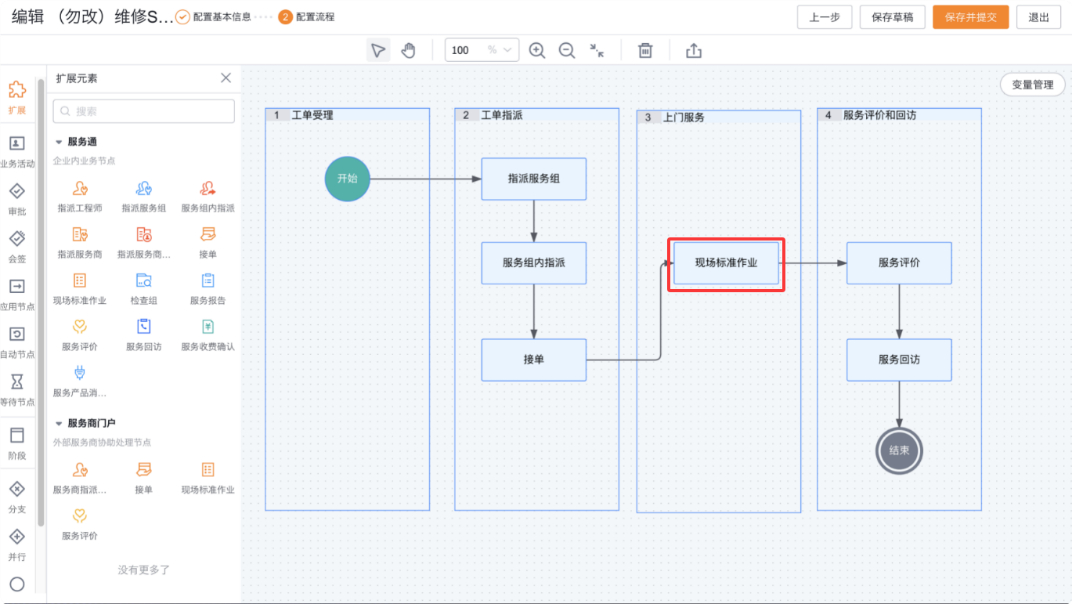
This capability supports the Execute Standard Operations process node for on-site service. For example, an engineer can download data before entering an underground equipment room or remote facility.
An offline work order is not an offline copy of the complete work order process. Its support scope is as follows:
| Scenario | Is it supported offline | Description |
|---|---|---|
| View work orders | Support | You can view the list and details of downloaded work orders |
| Update the basic information of the work order | Support | Save the modification results locally and upload them after the network is restored |
| Perform on-site standard operations | Support | Including sign-in, fault confirmation, filling in inspection items, recording spare parts consumption, filling in service items or products |
| Generate service report | Not supported | Internet connection is required to call the print template |
| Service evaluation | Not supported | You cannot scan the QR code to evaluate or send SMS or WeChat messages when offline |
| SOP repeated actions | Not supported | Need to be processed in a networked environment |
| Re-match SOP after modifying the work order | Not supported | Modifying work order data offline will not trigger SOP re-matching |
Core concepts
Offline work orders are run in the following order:
- Administrator Configuration Rules: When Service Pass is initialized, the "Work Order Offline Data Package" rule and the "Offline Work Order" menu will be created at the same time, but the rules are disabled by default. Administrators need to check the data scope and related objects before enabling the rule.
- Engineer Internet Download: Engineers enter Offline Work Order > Download Offline Data Package on the Service Pass mobile terminal. The system matches the rules according to the current user and displays the rule with the highest priority.
- Engineer offline work: Go to Offline Work Order > Pending Work Order to process the work orders that have been downloaded to the local and on-site standard operations.
- Engineer online upload: After the standard operation is completed and the device is restored to the network, the system automatically uploads local data. Engineers can also check the progress and handle failure records in Offline Work Orders > Work Orders to be Uploaded.
Rule matching and data range
- The system matches offline rules based on the people, departments and roles associated with the current user, and only displays the one with the highest priority.
- The priority ranges from 0 to 9. The larger the number, the higher the priority. When the priorities are the same, the rule with the latest creation time is used.
- The actual downloaded data must meet both the data range of the offline rules and the current user's data access rights, that is, the intersection of the two.
- The number of downloads and interception order can be set for each object. A maximum of 2000 records can be downloaded for a single object.
- On-site standard job instances, process instances, action instances, inspection groups and inspection items associated with work orders are available for local editing. When downloading these data, the data associated with the downloaded work order shall prevail and will not be limited by the number of downloads and interception rules in its configuration items.
Role boundaries
| Role | Responsibilities | User side |
|---|---|---|
| Administrator | Maintain offline rules, data scope, attachment scope and applicable personnel, and enable rules | Web management terminal |
| Service Engineer | Download data online, perform on-site standard operations offline, and upload local data online | Service Mobile Terminal |
| Collaborative Engineers | The default rule can filter the work orders that are participated in and in progress by "currently logged in person" | Service Pass Mobile Terminal |
Usage restrictions
IMPORTANT
- Offline rules support platform applications, not connected applications.
- Eligible users must be internal users. External connected users are not supported.
- The Execute Standard Operation button is only displayed for work orders that have been downloaded to the local and generated SOP instances.
- Offline check-in and check-out only record the timestamp and latitude and longitude.
- Service reports and service evaluations must be completed in a network environment.