Appearance
Remote service tools overview
Overview
The remote service tool is used to initiate video communication during online consultation or on-site service records. It is suitable for remotely viewing problem symptoms, assisting customers in operations, or supplementing confirmation information before arriving on site.
Existing Service Pass materials include two types of capabilities:
- Quick initiation of Tencent meetings: Customer service staff can initiate Tencent meetings from the customer service workbench; service engineers can initiate Tencent meetings from business objects such as work orders and service requests.
- End-user video support: Customers initiate video support from an online consultation, equipment, service request, or another configured entry point. This scenario uses Tencent Cloud TRTC, so customers do not sign in to Tencent Meeting.
The access methods and participation methods of these two types of capabilities are different, and the Tencent conference account binding steps cannot be directly applied to end customer video customer service.
Applicable scenarios
| Scenario | Initiator | Entrance | Implementation | Main Limitations |
|---|---|---|---|---|
| Convert online consultation to video communication | Customer service staff | Customer service workbench chat toolbar | Tencent conference | Customer service staff need to complete the binding of Tencent conference account first |
| Convert work order processing to video communication | Service Engineer | Operation menu for work orders, service requests and other objects | Tencent Conference | The business object must provide the initiate meeting operation |
| Customers actively request video services | end users | Online customer service consultation window, or portals for equipment and service requests | Tencent Cloud TRTC integration solution | Whether to open the portal and the specific access method depends on the enterprise's integration solution |
NOTE
The source shows only the web interface. Confirm availability in your enabled client; do not assume that web and app capabilities are identical.
Core concepts
Customer service workbench initiates Tencent meeting
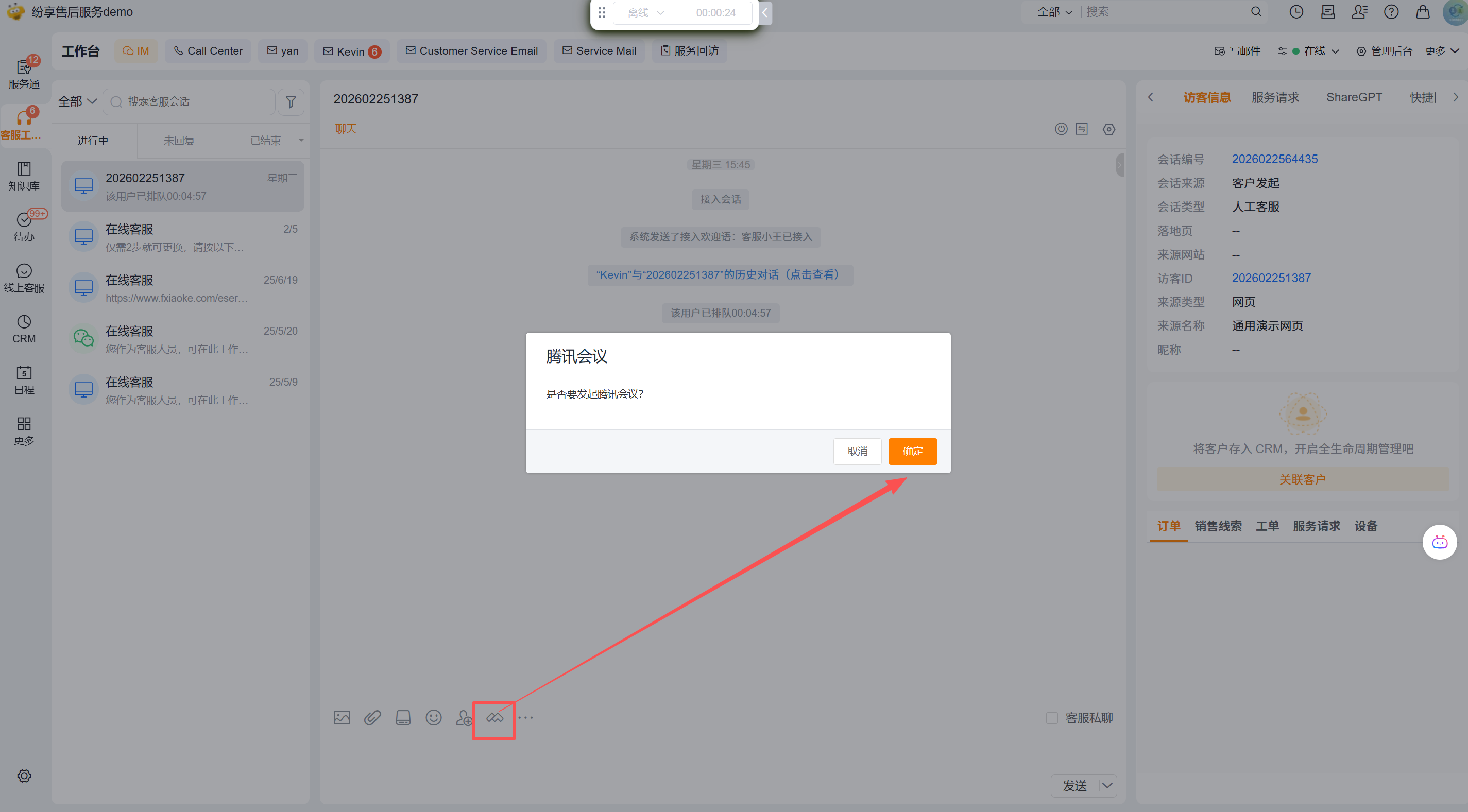
When customer service staff are chatting with customers, they initiate a meeting through the Tencent meeting tool below the input box. If the Tencent conference account has not been bound yet, you need to complete the binding according to the page prompts; confirm the creation of the conference when initiating it.
Initiate a Tencent meeting from a work order or service request
The service engineer enters the meeting creation process through More > Initiate a Meeting on the details page of an object such as a work order or service request. The page supports the choice of real-time meeting or reservation meeting:
- Live Meeting: Use to start remote communication immediately.
- Reserve a meeting: You need to fill in the topic, start time and duration, and you can also choose whether to synchronize the meeting to the schedule.
The meeting capability is used as a collaboration tool on business objects; the existing information does not indicate that initiating a meeting will automatically change the status of the work order or service request, so the records still need to be processed according to the original business process.
End users request video support
End customers can initiate video customer service from the online customer service consultation window or from the device, service request, etc., without logging in to Tencent Conference. This capability uses Tencent Cloud TRTC integration solution and is not equivalent to customer service staff or engineers quickly creating Tencent meetings in the system. Existing information does not provide the backend configuration fields, activation steps or terminal pages of TRTC, so implementation needs to confirm the entrance, authentication and service acceptance methods in conjunction with enterprise procurement and integration solutions.
Use boundaries
- Tencent meeting quick initiation relies on the actual meeting tool displayed on the page or the start meeting operation; when the entrance is not visible, the existing data is not enough to determine whether it is caused by permissions, function activation or page configuration. The administrator should check the enterprise configuration.
- Meetings are used to establish remote communication and do not mean that work orders or service requests have been saved, submitted or completed.
- Synchronize meeting to schedule in the scheduled meeting is optional; only after checking it, the schedule should be checked according to the page results.
- The original information does not describe how to send meeting invitations, meeting cancellation rules, meeting record write-back or recording capabilities, and it should not be assumed that the system will automatically perform these actions.