Appearance
Channel and client support
Overview
Service Pass supports employee and agent submissions, end-user self-service, equipment codes, email or system integrations, and provider portals. Authentication, permissions, and available business types differ by channel.
Channel matrix
| Channel | Primary users | Required configuration | Scope and limitations |
|---|---|---|---|
| ShareCRM Web or App | Salespeople, employees, dispatchers, administrators | Assign work order permissions and business types. Configure Web or App menus. | Employees can submit for customers. Internal roles and layouts control fields and buttons. |
| Customer service workbench | Online and call center agents | Grant work order permissions and business types. Expose the object in the channel extension bar. | Agents submit for customers and must verify customer and contact identity. |
| WeChat official account | End users | Bind a verified service account. Configure menus, registration, sign-in, objects, and permissions. | Supports portal access and work order submission or tracking. Guest access can be enabled by default. |
| WeChat mini program | End users | Use the public mini program or bind an enterprise mini program. Configure the portal and registration. | Enterprise mini programs require certification, authorization, and WeChat review. Binding can affect existing functions. |
| H5 or web portal | End users | Configure the mobile end-user view or customer service portal site. | Accessible from a microsite or website menu. Some site capabilities can be in phased rollout. |
| Equipment QR code or barcode | End users, engineers | Enable equipment management, grant equipment access, and configure equipment codes. | Opens equipment details or repair submission. Guest access to all equipment requires public data permissions. |
| Email-to-work-order | External customers, agents | Configure an after-sales mailbox and conversion rules. | Rules determine record type, field mapping, and identity matching. |
| External system integration | Enterprise applications | Use the integration platform, custom development, or Open API. | Requires development. Smart forms cannot automatically match custom-system users to CRM accounts or contacts. |
| Provider WeChat service account | Provider staff | Bind a provider service account, connect its menu to the portal, and configure provider roles. | Use a separate service account from the end-user channel when possible. |
| Provider web portal | Provider staff | Configure Web channel navigation and provider portal menus in interconnection management. | Users sign in through the provider portal URL with a mobile number or WeChat scan. |
| Provider ShareCRM App | Provider staff | Configure channel navigation and provider portal application menus. | Users enter the provider portal after App sign-in. Direct channel or agency portal routes are not recommended. |
End-user identity and menus
WeChat and mini program menus usually connect to the Service Pass end-user application. Configurable entries include the home page, query tool, submission, tracking, equipment, service requests, and knowledge base.
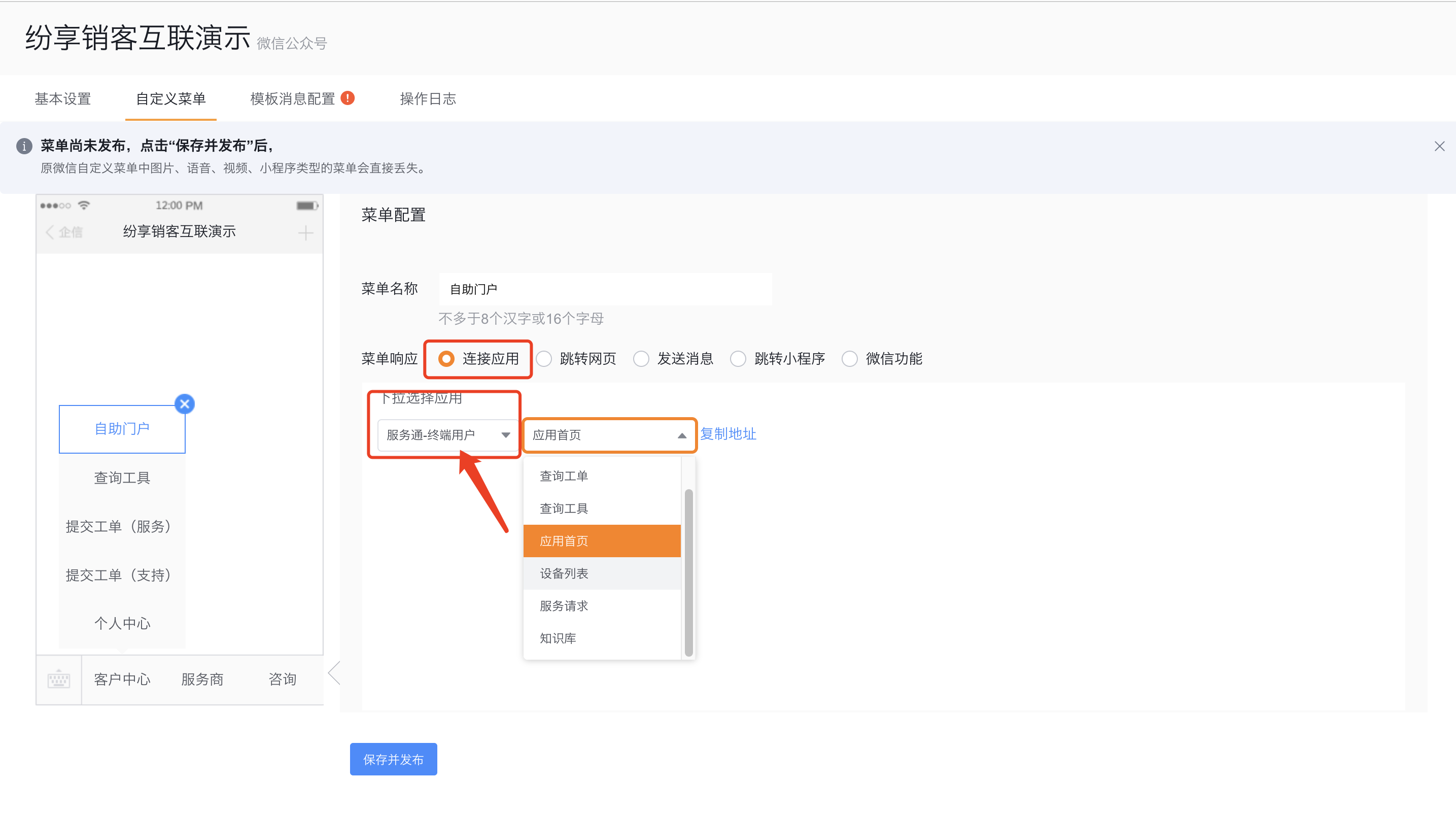
Guest access can be enabled by default. To restrict access, configure registration, sign-in, interconnection roles, objects, and business types before publishing the menu.
Service provider channel considerations
- A CRM administrator binds the provider WeChat service account, and a WeChat administrator authorizes it. Subscription and unverified accounts are unsupported.
- Add the provider portal to Web and App channel navigation. Assign the correct scope to provider roles.
- The provider portal, channel portal, and agency portal are parallel applications. Do not substitute another portal for the provider portal.
Limitations
- Channel access alone does not allow submission. Objects, business types, fields, data permissions, and layout buttons must also be available.
- WeChat subscription and unverified service accounts are unsupported. Enterprise mini programs require certification, authorization, and review.
- Guest submissions can belong to a configured guest account. Registration settings determine whether customer and contact details are required.
- Equipment code queries and repair submission depend on equipment data permissions. Public permissions expand guest visibility.
- Embedding ShareCRM pages in custom apps, sites, or mini programs requires enterprise development. Smart forms cannot automatically match CRM identities.